

DigiStatement
No Result
View All Result
Saturday, December 27, 2025
  • PC
  • PlayStation
  • Xbox
  • Nintendo
  • Mobile
  • Technology
    • Apple
    • Asus
    • Google
    • Huawei
      • Honor
    • Lenovo
      • Motorola
    • LG
    • Nokia
    • OnePlus
    • Oppo
    • Realme
    • Samsung
    • Vivo
    • Xiaomi
    • Downloads
      • Apps
      • Wallpapers
  • About Us
    • About DigiStatement
    • Privacy Policy
    • Editorial Policy
    • Cookie Policy
  • Meet Our Team
  • Contact Us
DigiStatement
  • PC
  • PlayStation
  • Xbox
  • Nintendo
  • Mobile
  • Technology
    • Apple
    • Asus
    • Google
    • Huawei
      • Honor
    • Lenovo
      • Motorola
    • LG
    • Nokia
    • OnePlus
    • Oppo
    • Realme
    • Samsung
    • Vivo
    • Xiaomi
    • Downloads
      • Apps
      • Wallpapers
  • About Us
    • About DigiStatement
    • Privacy Policy
    • Editorial Policy
    • Cookie Policy
  • Meet Our Team
  • Contact Us
No Result
View All Result
DigiStatement
No Result
View All Result
Home Games

Expedition 33 Steam Deck support details

by Rohit Kumar
October 29, 2025
in Games, Gaming
Expedition 33 Steam Deck support details

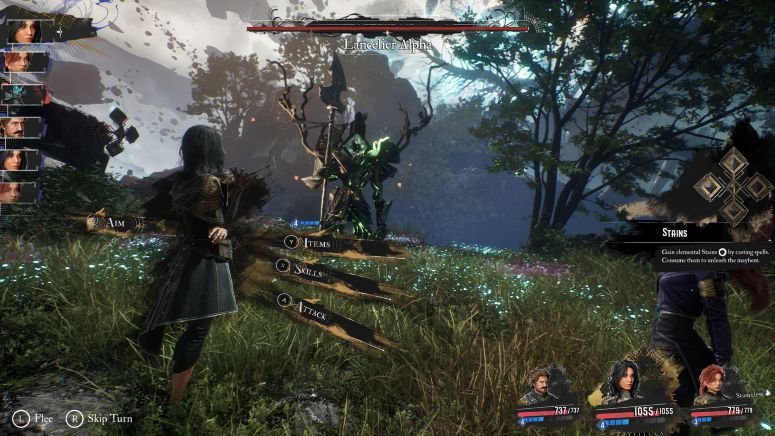
Clair Obscur: Expedition 33 is a dark fantasy, RPG game that was released on April 24, 2025. Since then, it has been available on PS5, Windows, and Xbox Series X/S. While it is not confirmed whether the game will be ported to other platforms, it is still playable on the Steam Deck. Therefore, this article discusses the user recommendations to play the game on the Steam Deck and possible future support.
Expedition 33 Steam Deck support details

Expedition 33 Steam Deck support details

During the initial release phase, the developers expressed their support for optimizing Expedition 33 for Steam Deck. While they didn’t mention any immediate changes, the overall effort has been positive so far. Players can easily achieve 30 FPS for most of the gameplay. The turn-based combat mechanism helps in this, as there is no real-time fast action involved. You will need to change some launch options to run the game smoothly on Steam Deck.

Firstly, switch to Proton GE from the game properties. Find the game in the Steam library, right-click on it, and select ‘Properties’. From the compatibility tab, find the option to ‘force use of specific Steam play compatibility tool’ and select Proton GE.

When you get to the prologue, switch to desktop mode to avoid any crashes. After you reach the starting area, you need to type a command in the launch options. The launch options can be found from the ‘General tab’ in the ‘Properties’ menu, which has been previously discussed. Paste the following command in the box and launch the game: “SteamDeck=0 %command%”. Remove this command when you reach the next prologue and enable it again after the cutscene.

The game should run fine with these points in mind and all settings at low. Most of the players have been able to enjoy Expedition 33 on Steam Deck without much hassle. However, you can let us know if you are stuck with any specific issue. That will be all from Digistatement. We will keep you updated in case there’s any news about official Steam support from the developer’s end.

Tags: FantasyJRPGRPGStory RichTurn-Based Combat
Previous Post

Necesse Steam Deck no sound issue: How to fix it?

Next Post

Expedition 33 Steam Deck settings for high FPS & performance

Next Post
Expedition 33 Steam Deck settings for high FPS & performance

Expedition 33 Steam Deck settings for high FPS & performance

Advertisements

ADVERTISEMENT

© 2025 DigiStatement - All Rights Reserved

We use cookies on our website to give you the most relevant experience by remembering your preferences and repeat visits. By clicking “Accept”, you consent to the use of ALL the cookies.
Do not sell my personal information.
Cookie settingsACCEPT
Privacy & Cookies Policy

Privacy Overview

This website uses cookies to improve your experience while you navigate through the website. Out of these cookies, the cookies that are categorized as necessary are stored on your browser as they are essential for the working of basic functionalities of the website. We also use third-party cookies that help us analyze and understand how you use this website. These cookies will be stored in your browser only with your consent. You also have the option to opt-out of these cookies. But opting out of some of these cookies may have an effect on your browsing experience.
Necessary
Always Enabled
Necessary cookies are absolutely essential for the website to function properly. This category only includes cookies that ensures basic functionalities and security features of the website. These cookies do not store any personal information.
Non-necessary
Any cookies that may not be particularly necessary for the website to function and is used specifically to collect user personal data via analytics, ads, other embedded contents are termed as non-necessary cookies. It is mandatory to procure user consent prior to running these cookies on your website.
SAVE & ACCEPT
No Result
View All Result
  • PC
  • PlayStation
  • Xbox
  • Nintendo
  • Mobile
  • Technology
    • Apple
    • Asus
    • Google
    • Huawei
      • Honor
    • Lenovo
      • Motorola
    • LG
    • Nokia
    • OnePlus
    • Oppo
    • Realme
    • Samsung
    • Vivo
    • Xiaomi
    • Downloads
      • Apps
      • Wallpapers
  • About Us
    • About DigiStatement
    • Privacy Policy
    • Editorial Policy
    • Cookie Policy
  • Meet Our Team
  • Contact Us

© 2025 DigiStatement - All Rights Reserved